
You open your Shopify dashboard on a Monday morning. Sessions are up. Bounce rate looks fine. Nothing is obviously broken. Yet revenue has stalled, and you cannot point to a single reason why.
This is not a data problem. Most stores have more data than they know what to do with, spread across Shopify analytics, Google Analytics, and half a dozen app dashboards. What is missing is a clear next step. That gap between having numbers and knowing what to fix is exactly where QQQE Quick Wins earn their place in a merchant's routine because they turn a full store diagnosis into two specific actions you can take today.
This article walks through how QQQE's Quick Wins are generated, why merchants should act on them from the first session, and what that says about the difference between an analytics tool and a growth advisor.
Why Most Store Analysis Never Turns Into Action
Store analysis rarely fails because it lacks detail. It fails because it hands merchants a list of forty findings and no sense of which one matters most this week.
A typical Shopify store owner already juggles native analytics, an email platform's reporting, a reviews app's dashboard, and possibly a separate CRO tool. Each one measures something real. None of them tells you which fix will move revenue fastest.
This is not unique to Shopify. McKinsey found that only 10 percent of executives believed they had sufficient data and insight to back their growth decisions, even inside large, well-resourced companies (McKinsey & Company, "Achieving growth: Putting leadership mindsets and behaviors into action”). If executives with full analytics teams struggle to act on data, a solo Shopify founder checking dashboards between orders faces the same problem, just with fewer resources to solve it.
That guesswork is not a failure of effort. It is what happens when data outpaces direction.
What Makes QQQE's Quick Wins Different
QQQE approaches this problem from the opposite direction. Instead of adding another dashboard, it runs a full AI-powered diagnosis and narrows the output down to what actually needs your attention first.
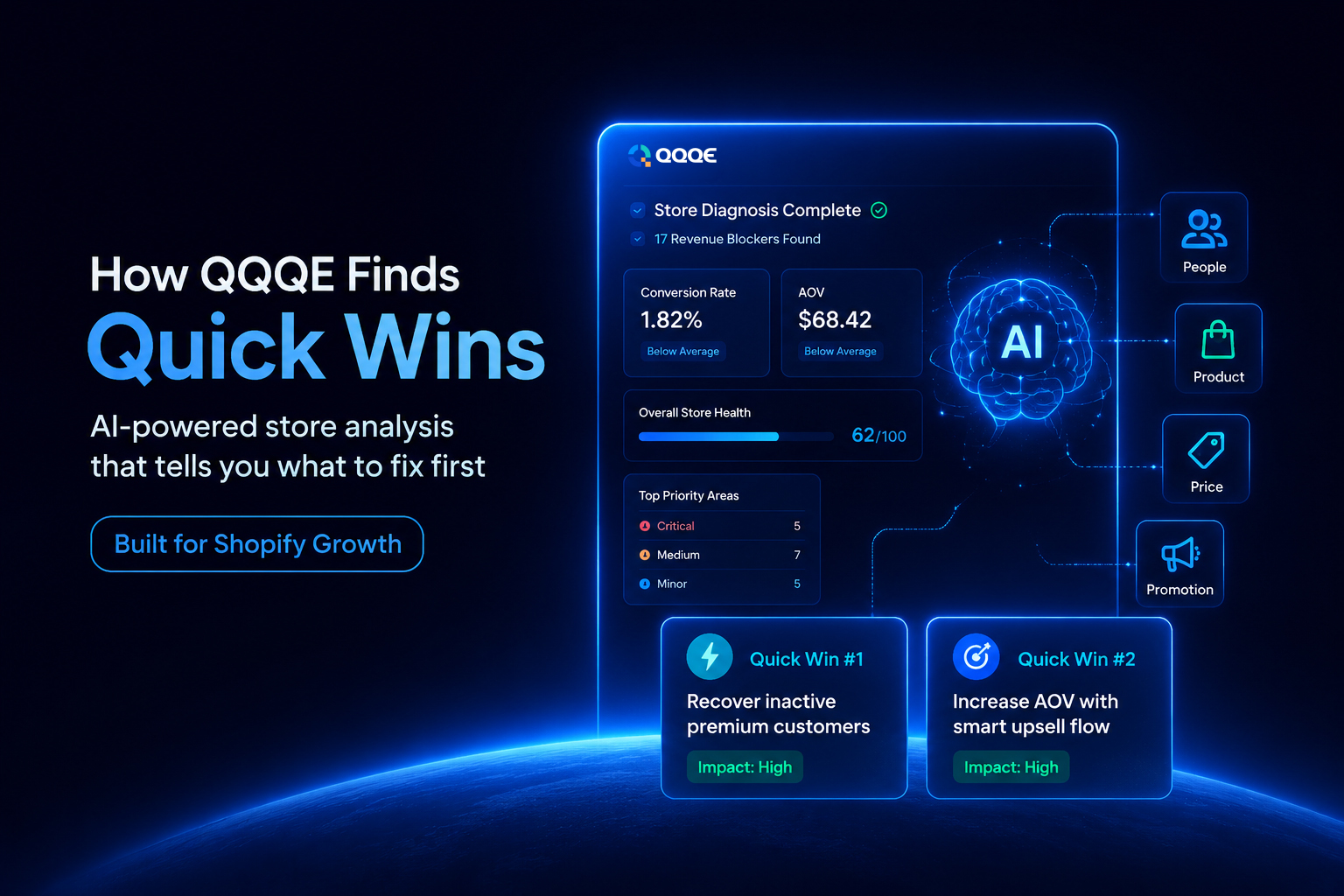
Here is what happens under the hood. Once a merchant connects their store, QQQE analyses activity across four dimensions: People, Product, Price, and Promotion. This is the same 4Ps framework retailers have used for decades, rebuilt for how a Shopify store actually behaves.
- People: cover customer behaviour: churn rate, inactive premium customers, peak traffic hours, repeat visitor rate, and how often browsing turns into an add-to-cart.
- Product: looks at which items get traffic but few purchases, which ones sit at zero sales, and where checkout abandonment concentrates by product.
- Price: checks how purchases cluster across price bands and which price range is driving the most abandoned checkouts.
- Promotion: covers checkout completion and order value, including abandoned checkouts and the average order value of your repeat customers.
QQQE then benchmarks your store against similar Shopify businesses in your category, so a conversion rate that looks worrying in isolation can be judged against real context. From that combined analysis, it surfaces up to 17 revenue blockers, each ranked as Critical, Medium, or Minor, with a plain-language explanation and a ready-to-use fix attached to every one.
Two of those findings get flagged as Quick Wins: one tied to the KPI you selected during setup and one surfaced independently because it is the highest-impact opportunity the diagnosis found. Both are specific to your store, not generic best-practice advice.
How Quick Wins Are Generated
The process is straightforward enough to run without a developer or an analyst on staff.
- Install and connect. Setup takes roughly two minutes from the Shopify App Store.
- Set your focus. You choose your store category and the KPI you most want to move, whether that is average order value, churn, or conversion rate.
- AI analysis runs. QQQE scans your store data across People, Product, Price, and Promotion.
- Benchmarking happens. Your numbers get compared against similar stores, not a generic global average.
- Blockers get ranked. Up to 17 issues surface, sorted by Critical, Medium, or Minor severity.
- Two Quick Wins appear. One matches your chosen KPI. One reflects the biggest opportunity QQQE found elsewhere in the store.
- You act. Each Quick Win comes with a suggested campaign, whether that is a discount, an email flow, or a pop-up, ready to launch from inside QQQE.
- The cycle repeats. Every seven days, QQQE re-analyses the store and refreshes its findings as your business changes.
The first full diagnosis is ready within 24 hours of setup. For a merchant used to waiting weeks for a manual agency review, that turnaround alone changes how the tool gets used.
Why Merchants Should Act From the First Session
Quick Wins are built to be easy to say yes to. Here is why.
Imagine getting a 40-item findings list instead. You would have to read every item, work out what matters most, check your budget, and decide what to trust. That takes a whole afternoon you probably do not have.
A Quick Win skips all of that. QQQE has already done the thinking for you. You are not deciding what to fix. You are only deciding whether to launch the fix it already prepared. That is a much smaller decision, and small decisions get made fast.
Three things make it easy to act on:
- It has already worked out for you. You just choose to launch it or not.
- The risk is low. Most Quick Wins are things like a discount tweak or an email flow. If it does not work, you have lost very little.
- It is about your store, not a generic tip. The recommendation comes from your own store data, so it feels relevant straight away.
This matters most if you are running the store on your own or your team is small and stretched thin. You do not have time to sit and plan. You need something you can act on in minutes, and Quick Wins are built for exactly that.
One more thing worth knowing: Quick Wins do not sit around waiting. Every seven days, QQQE runs a fresh analysis and replaces the current Quick Wins with new ones. So if you wait too long, you are not saving the recommendation for later. You are simply missing it.
Real Examples of Quick Wins
Here is what this can look like once QQQE analyses your store.
Inactive premium customers.
QQQE scores every customer on recency, frequency, and monetary value, then clusters them to find your premium segment. When a group of high-value customers has not ordered in over 150 days, the Quick Win flags exactly how many and recommends a win-back campaign, since retaining a premium customer is cheaper than acquiring a new one.
Products with traffic but no purchases.
A product sits in your top three most-viewed items, yet its purchase rate falls well below similar high-traffic products. QQQE flags the gap and points to the likely cause, whether that is pricing, product copy, or missing reviews.
Checkout abandonment concentrated in one price band.
QQQE groups products into low, medium, and high price tiers and tracks where abandoned checkouts cluster. If most abandonment sits in your high-priced tier, the Quick Win suggests adding value signals such as bundling or clearer product benefits to justify the price.
Average order value of repeat customers.
QQQE calculates AOV specifically for customers who have ordered more than once. If that number is lower than expected, the Quick Win suggests an upsell or bundle prompt aimed at loyal buyers, since this segment already trusts your store enough to spend more.
Zero-selling products.
QQQE identifies products that have never been ordered, even once. The Quick Win recommends repositioning these items with better placement and copy, or removing them, since dead stock quietly drags down your store metrics.
Each one follows the same shape: a specific problem, why it matters for revenue, and an action you can take without a developer.
Continuous Improvement Instead of a One-Time Analysis
A store that looked healthy in January will not necessarily look healthy in June. Competitors change their pricing. Customer expectations shift. A promotion that converted well last quarter can quietly stop working as ad costs rise or audiences fatigue.
A one-time analysis captures a single moment. It cannot tell you when that moment has passed.
This is why QQQE re-runs its full analysis every seven days rather than treating diagnosis as a launch event. As your store evolves, so do the Quick Wins. A merchant who fixed a pricing issue in March gets a fresh, relevant recommendation in April, not a repeat of last month's findings.
Your Store Data Stays Secure
Handing an app access to customer, order, and pricing data is not a small ask, and QQQE treats it accordingly. The platform only accesses store data with merchant permission and follows strict security practices throughout, including VAPT (Vulnerability Assessment and Penetration Testing) certification to validate its defenses against common attack vectors. For a tool that sits this close to your revenue data, that groundwork matters as much as the insights themselves.
Why Quick Wins Help Merchants Move Faster
Most Shopify stores are not short on data. They are short on a clear next step, and that gap is where growth quietly stalls, week after week.
QQQE's Quick Wins close that gap by doing the prioritizing for you: one AI-powered diagnosis, benchmarked against real stores in your category, distilled into two actions you can take before your coffee goes cold. That is a different kind of tool from a dashboard that reports on what already happened.
If your store's numbers have felt flat without an obvious reason why, it might be worth seeing what a first diagnosis turns up. You can explore how it works at qqqe.io or install QQQE directly from the Shopify App Store.
Frequently Asked Questions
Q.1 What are QQQE Quick Wins?
Quick Wins are the two highest-priority, ready-to-act recommendations QQQE surfaces from each store diagnosis: one tied to your chosen KPI and one reflecting the biggest opportunity found elsewhere in your store.
Q.2 How does QQQE analyse a Shopify store?
It connects to your store data and evaluates performance across four areas: People, Product, Price, and Promotion, then benchmarks the results against similar Shopify stores in your category.
Q.3 How long does the first analysis take?
The first full diagnosis is ready within 24 hours of setup, which itself takes about two minutes.
Q.4 How often are Quick Wins updated?
QQQE re-analyses your store every seven days, so recommendations stay current as your store and market change.
Q.5 Can Quick Wins be implemented without a developer?
Yes. Each Quick Win comes with a ready-to-launch campaign, such as an email flow, discount, or pop-up, that can be configured directly inside QQQE.